Project Overview
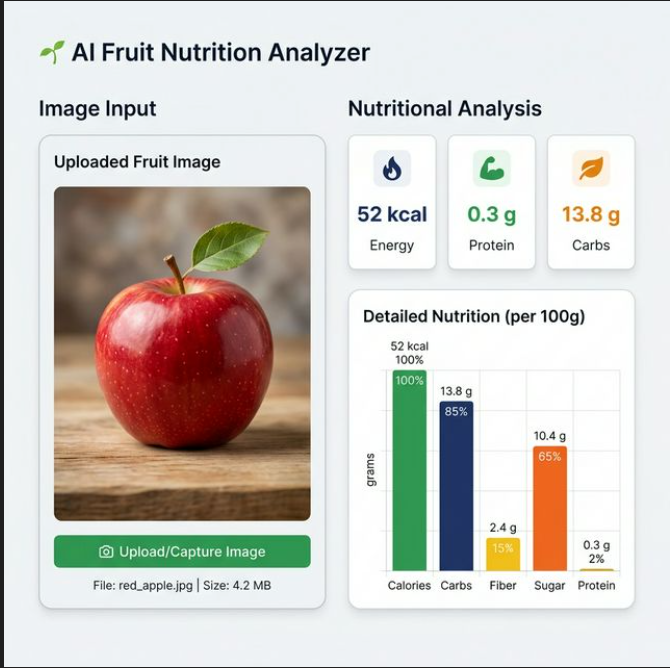
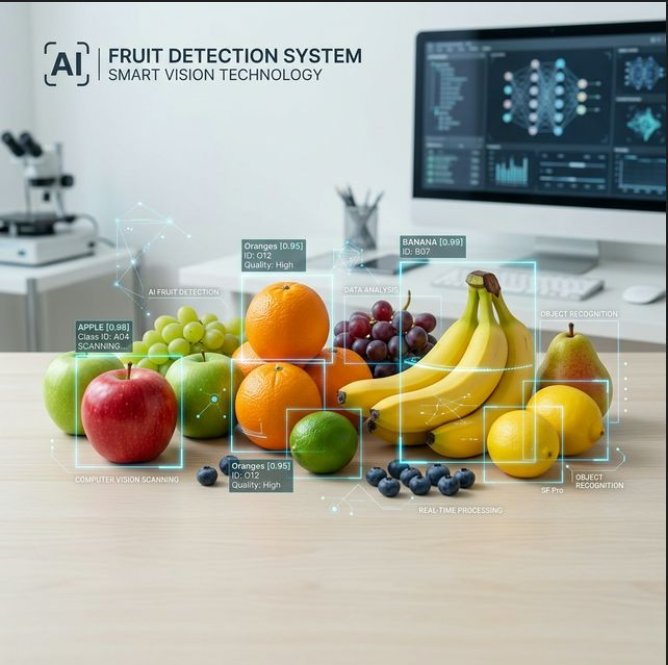
The AI Fruit Nutrition Analyzer is a web-based Python application that uses computer vision to identify fruits from uploaded images. Once a fruit is detected, the application automatically retrieves and displays its detailed nutritional information (like calories, proteins, carbohydrates, and fiber) alongside a visual chart of the nutritional breakdown.
Screenshots
Key Features
- Image Recognition: Users can upload an image of a fruit (JPG, PNG, JPEG), and the app uses a deep learning model to accurately identify it.
- Confidence Scoring: The app displays an AI confidence percentage, showing how certain the model is about its prediction.
- Nutritional Breakdown: Automatically fetches and displays key nutritional metrics including Energy (kcal/kJ), Protein (g), Carbohydrates (g), and Fiber (g).
- Data Visualization: Generates a dynamic Matplotlib bar chart to visually compare the Protein, Carbohydrates, and Fiber of the detected fruit.
- Large Dataset Support: Supports recognizing numerous fruit classes based on the prominent “Fruits-360” dataset.
How It Works
- Upload & Preprocessing: The user uploads a fruit image via the Streamlit interface. The image is converted to RGB, resized to
100x100pixels, and normalized (pixel values divided by 255.0) to match the format the AI model expects. - Prediction: The preprocessed image is passed into a pre-trained Keras model (
fruit_detection_model (2).h5). The model outputs a prediction array. - Label Extraction: The app finds the highest probability in the prediction array (the confidence score) and matches the index to a list of folder names found in the
fruits-360/Trainingdirectory to get the raw fruit label. - Nutrition Search: The raw label is cleaned up (numbers removed, converted to lowercase) and cross-referenced with a Pandas DataFrame loaded from nutrition1.csv.
- Displaying Results: If nutrition data for the fruit is found, the app displays the metrics using Streamlit’s dashboard components and draws a bar chart for quick visual analysis.
Technologies used
- Frontend UI Framework: Streamlit (Used to build the web interface rapidly in pure Python).
- Machine Learning & AI: TensorFlow / Keras (Used for loading the pre-trained deep learning h5 model and making predictions).
- Data Manipulation: Pandas (For reading and searching the nutrition1.csv file) and NumPy (For expanding image arrays and calculating max probabilities).
- Image Processing: PIL (Pillow) (For opening and resizing the uploaded images).
- Data Visualization: Matplotlib (For plotting the nutritional bar charts).
System Requirements
- Operating System: Windows, macOS, or Linux.
- Programming Language: Python 3.7 or higher.
- Required Libraries: (
pip install -r requirements.txtor manually installing the following)streamlittensorflownumpypandasmatplotlibPillow
- Hardware: A standard modern CPU. Since the model is lightweight (~21 MB), a dedicated GPU is not strictly necessary for inference, though 4GB+ of system RAM is recommended to handle TensorFlow’s overhead.
Why This Project Useful
- Diet & Health Tracking: It acts as a highly convenient utility for people tracking their macros or calories. Instead of manually searching a database, a user can simply snap a picture of their snack.
- Educational Value: It introduces users and students to lesser-known fruits and their dietary benefits.
- Accessibility: For individuals who might know what a fruit looks like but don’t know its name (especially exotic fruits), the application bridges the gap by recognizing the object visually and providing its facts immediately.
Download Source Code
Project Setup Instructions
Note: This project is for educational purposes only. Not for commercial sale.